
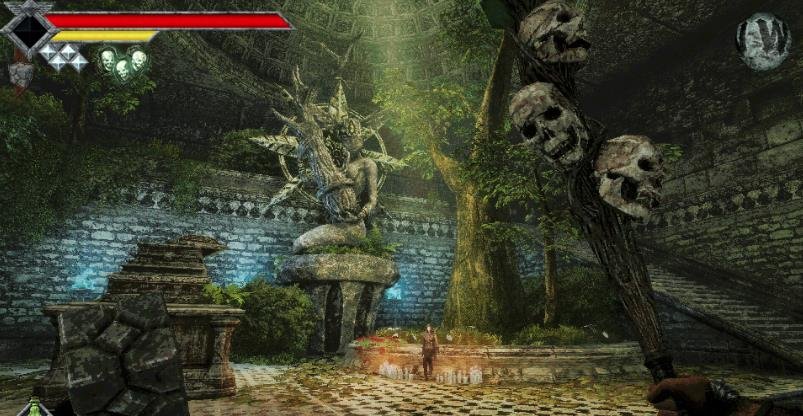
In this guide, I cover the basic gameplay mechanics of Queen’s Domain, including the HUD, character stats, combat system, and status effects. I also explain how saving, resting, monster respawns, treasures, Ancient Coins, and fast travel work. I have organized everything into simple sections to help you understand the game mechanics and make your journey easier.
HUD Explanation
Before getting into the main Queen’s Domain guide, I first explain the HUD and what each element does. Understanding these indicators will make it easier to manage your weapons, stamina, health, and other abilities during your journey.
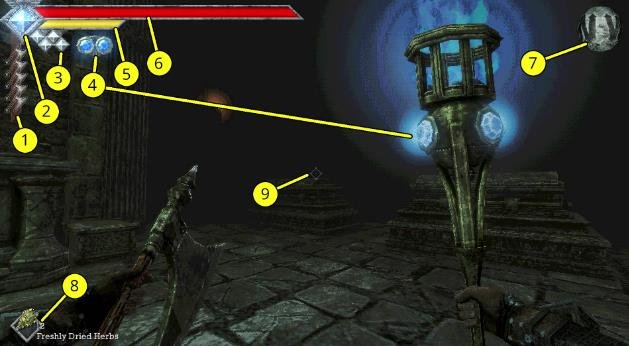
– Dagger Belt Charges: Shows how many charges are available for your currently equipped throwing weapon. Each throwing weapon takes some time to recharge before you can use it again.
– Special Attack Meter: Shows the charge level of your special attack with the sword Endu. This meter becomes available after retrieving the Storm Gem in the Tower of Knowledge, the third major area of the game.
– Wind Dash Meter: Shows how many Wind Dashes you have available. Each Wind Dash consumes one diamond, which gradually recharges over time. You can unlock additional Wind Dash charges by finding more Wind Gems throughout the game.
– Weapon Special Meter: Some weapons have special abilities that either recharge over time or build up as you attack with them. When you equip one of these weapons, its special meter appears to the right of the Wind Dash meter. Some weapons also display their charge level directly on the weapon model, such as the Azure Torch.
– Power Meter: This works like your stamina meter and determines the strength of your attacks. Running drains it, but you can still run when it reaches zero. However, your attacks become much weaker when your Power Meter is empty, so avoid running during combat whenever possible. You can also hold the primary attack button (left-click by default) to charge a stronger attack.
– Life Points: Your standard health meter. Its maximum capacity increases as you level up or equip certain items. If your Life Points reach zero, you die.
– Compass: There is no map in Queen’s Domain, so the compass is one of your main navigation tools. It shows which direction you are facing.
– Quick Slots: These are the items displayed in the bottom-left corner of the screen. You can use them by pressing the Use Item key (F by default). Use the mouse wheel to switch between items. You can also remove items from Quick Slots through your inventory to reduce the number of items you need to scroll through.
– Crosshair: Shows where you are aiming. It also has another useful function: the crosshair lights up whenever you are looking at something you can interact with. Pay attention to it while exploring.
How to Play Queen’s Domain
Now that the HUD explanation is out of the way, it’s time to go over the main gameplay mechanics. Queen’s Domain does not explain everything clearly, and the in-game guide only covers the basics. There are several important mechanics that are easy to miss if you don’t pay attention.
Below, I explain the main mechanics, combat system, stats, and other useful things you should know before progressing further.
Understanding Your Stats
You can check your current stats by opening the Status & Inventory menu. Here is what each stat does:
– Level: Your standard RPG level. You gain EXP by defeating enemies, and once you collect enough, you level up. Each level increases your maximum Life Points and base Attack Power.
– EXP to Next: Shows how much additional EXP you need to reach the next level. You can check the EXP values of monsters in the bestiary.
– Total EXP: Shows the total amount of EXP you have collected.
– Life Points: Displays your current and maximum health.
– Status: Shows any negative status effects currently affecting you. These effects are explained further below.
– Attack Power: Determines your base damage. Your equipped weapon can increase this value further.
– Attack Speed: Shows any bonuses affecting how quickly you attack.
– Magic Rate: Shows bonuses that affect the recharge speed of your magical weapons.
– Luck: Its exact function is not entirely clear, but it likely influences things such as item and loot drop rates.
– Damage Res: Shows your overall resistance to incoming damage as a percentage.
– Poison Res, Heavy Res, etc.: These stats show your resistance to specific negative status effects, also expressed as percentages.
Your stats can increase through leveling up, but certain foods can also provide permanent bonuses. For example, eating Broiled Meat permanently increases your Attack Power by a small amount.
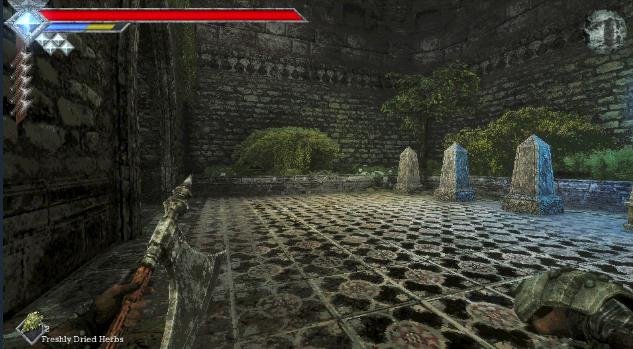
Accessories are another important way to improve your character, especially when it comes to resistances. You can find accessories throughout the world or purchase them from the shop.
Combat Basics
Queen’s Domain is not a game where you can simply keep attacking enemies without thinking. The combat system depends heavily on your Power Meter, which is the yellow stamina bar displayed below your Life Points.
Understanding how this meter works is important because it directly affects the damage you deal.
- Full Power Meter: Your melee attacks deal their full damage when the meter is completely charged.
- Empty Power Meter: Your attacks deal almost no damage when the meter is empty.
- Continuous Attacking: Constantly attacking enemies gives your Power Meter very little time to recharge, resulting in much lower damage.
Instead of repeatedly attacking, I recommend using the following approach:
- Wait until your Power Meter is completely full.
- Attack the enemy once.
- Move away and let the meter recharge.
- Attack again once your Power Meter is full.
There are a few other things you should know about the Power Meter:
- Running: Running drains your Power Meter. You can still run when it reaches zero, but the meter will not recharge until you stop.
- Wind Dash: Using your Wind Dash also consumes Power Meter energy.
- Charged Attacks: You can hold the primary attack button (left-click by default) to charge a stronger attack. The meter gradually turns blue, and once it is completely blue, your melee attack deals maximum damage.
There is one downside to charged attacks. While holding a charge, you cannot run, use Wind Dash, or throw weapons.
However, you don’t need to wait for your Power Meter to recharge completely before starting a charged attack. You can begin charging even when the meter is still recovering.
Resting, Saving, and Monster Respawns
Queen’s Domain follows the style of classic PC RPGs, which means you need to be careful with your progress. There are no automatic checkpoints, and you must manually save your game at Crystal Monuments.
If you die without saving, you will have to load your most recent save and lose all progress made since then.
I recommend saving whenever you get the opportunity. There are no real disadvantages to saving frequently, and sometimes it is better to backtrack to an earlier Crystal Monument rather than risk losing your progress.
Crystal Monuments also have a Rest option, which provides two important benefits:
- Fully restores your Life Points.
- Removes all negative status effects currently affecting you.
However, resting also respawns every enemy in the area. If you have already cleared an area and return to a Crystal Monument to heal, you will need to fight those enemies again.
Enemies can also respawn automatically after a certain amount of time has passed. This means you should not assume that previously cleared areas will remain safe when you return.
Status Effects
There are nine main negative status effects in Queen’s Domain. You can check them through the Status Effects section in the in-game Guide menu.
Most status effects appear to disappear on their own after some time. If you don’t have the correct item to cure an effect, you can usually wait until it wears off.
You can also rest at a Crystal Monument to remove negative status effects and restore your health.
Here is what each status effect does:
– Poison: Slowly drains your Life Points over time. A purple mist appears on your screen while you are poisoned.
– Heavy: Reduces your movement speed and slows down Power Meter regeneration. This effect is represented by white lines falling across your screen like rain.
– Weaken: Increases the amount of damage you receive from enemies.
– Disease: Reduces the damage you deal. A black cloud appears on your screen and limits your vision.
– Sticky: Prevents you from using throwing weapons. A spider web appears across your screen.
– Binding: Prevents you from using magic. This also disables magical weapon abilities, such as the Azure Torch’s ranged fireball attack. Glowing green chains appear on your screen.
– Paralysis: Prevents you from moving or attacking.
– Azure Flame: Sets you on fire and continuously drains your Life Points. Blue flames appear on your screen.
– Magic Rot: Builds up gradually before rapidly draining your Life Points.
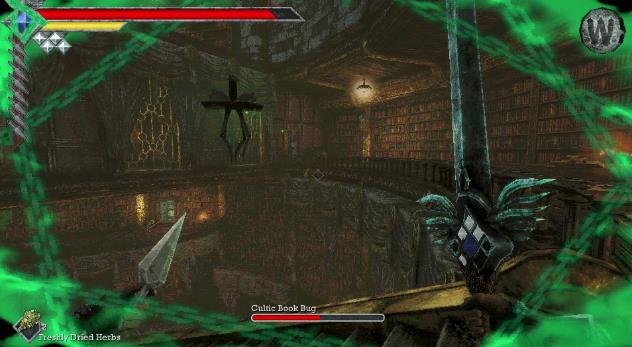
Some status effects can be difficult to deal with, especially when you encounter them for the first time. If you are unsure what is affecting you, check the Status section in your inventory.
Treasure and Ancient Coins
After spending some time exploring the Isle of Neasied, you will eventually find your first Ancient Coin.
Ancient Coins are the main currency in Queen’s Domain, and you can use them to purchase items from the shop. However, the shop only becomes available after defeating the first boss.
You may also find strange items such as the Filthy Loot Sack that don’t appear to have any immediate use.
Many of these items are classified as Treasure and can be sold at the shop in exchange for Ancient Coins. Not every unusual item is treasure, so check your inventory before deciding what to sell.
Where Do You Go? Is There a Map?
One of the biggest problems in Queen’s Domain is navigation. If you are wondering where to go next, you are not alone.
Unfortunately, there is no map in Queen’s Domain. Your main navigation tools are the compass and the landmarks scattered throughout the world.
If you get lost, look around your surroundings carefully. There may be a path, entrance, or hidden route that you have missed.
If you are completely stuck, you can also follow the game walkthroughs to find your way through different areas and discover additional secrets.
The World Changes As You Play
The world of Queen’s Domain is not completely static. Certain locations and characters change as you progress through the game.
These changes can sometimes be subtle, while others are much easier to notice.
One early example involves the knights found near the starting area and the Endu Shrine. When you first encounter them, they are either resting or wounded. However, after completing certain objectives and returning later, you will find that the knights are dead and monsters have taken over their camp.
Another useful feature is the number of shortcuts you can unlock throughout the world.
Similar to Skyrim, reaching the end of certain dungeons or paths can reveal shortcuts, ramps, or elevators. These make returning to previously visited areas much easier and save you from having to travel through the same routes again.
How to Fast Travel
There are three main ways to fast travel in Queen’s Domain. Each method uses a different item or location.
– Travel Crystal Fragment: Using this item takes you back to the last Crystal Monument where you saved your game.
– Wing Altar: These are fast-travel points that allow you to travel between discovered Wing Altars. Most zones have their own Wing Altar.
– Wing Stone Fragment: This item allows you to travel to any discovered Wing Altar from your current location. It is consumed when used.
With these mechanics explained, you should have a better understanding of how Queen’s Domain works. Keep an eye on your Power Meter, save your progress regularly, and explore your surroundings carefully.
Have fun, prince!