

In Onigotchi guide, I show where I find the Onigotchi save file and how I edit its values. I also list the variables I have identified so far, including vitality, strength, dexterity, money, and births.
Save File Location
I find the Onigotchi save file at:
%localappdata%\Onigotchi\save.ini
I can also access it manually through:
C:\Users\YOUR_USERNAME\AppData\Local\Onigotchi\save.ini
The easiest way I find it is to press Win + R and enter:
%localappdata%\Onigotchi
I press Enter and find the file:
save.ini

KNOWN VARIABLES
These are the variables I have identified so far:
- Variable 0 = Vitality
- Variable 1 = Strength
- Variable 2 = Dexterity
- Variable 6 = Money
- Variable 26 = Births
HOW TO EDIT IT
I completely close Onigotchi.
Then, I make a backup copy of save.ini.
After that, I open save.ini with a text editor. I use Visual Studio Code.
I find the variable I want to modify.
I change its value and save the file and I launch Onigotchi and check the changes.
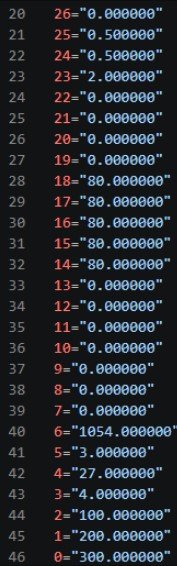
EXAMPLE
If I have: 0="10.000000"
I can change it to: 0="300.000000"
This modifies my vitality. I can modify the other stats in the same way by using their corresponding variable number.

MORE VARIABLES
I am still investigating what the remaining variables in save.ini represent.

If I discover what another variable does, I can add it to this guide. I hope this helps me experiment with my Onigotchi saves.